Here is a great reference for compile moblin application launcher
http://blog.csdn.net/dxglgd/archive/2008/09/08/2898213.aspx
Other reference
http://www.moblin.org/projects/application-launcher
http://www.moblin.org/projects/genesis-application-lifecycle-manager
2008年10月6日 星期一


Compile clutter 0.8.2
# Download library from http://www.clutter-project.org/sources/
# Install the following libraries before you compile these library
apt-get install build-essential xlibmesa-gl-dev libx11-dev libgtk2.0-dev freeglut3 freeglut3-dev
Ref:
http://www.clutter-project.org/sources/
http://www.clutter-project.org/blog/
Note:
In current Lenny distribution, we can use apt-get to install almost all clutter libraries with version 0.8
In current Ubuntu distribution, we can use apt-get to install almost all clutter libraries with version 0.6
# Install the following libraries before you compile these library
apt-get install build-essential xlibmesa-gl-dev libx11-dev libgtk2.0-dev freeglut3 freeglut3-dev
Ref:
http://www.clutter-project.org/sources/
http://www.clutter-project.org/blog/
Note:
In current Lenny distribution, we can use apt-get to install almost all clutter libraries with version 0.8
In current Ubuntu distribution, we can use apt-get to install almost all clutter libraries with version 0.6
Install minimal debian (lenny) + LXDE
# get the net install image from debian
http://cdimage.debian.org/cdimage/lenny_di_beta2/i386/iso-cd/debian-LennyBeta2-i386-netinst.iso
# Burn this iso image into CD-ROM
# Install minimal debian, follow the steps from screen
# When installation complete, add this line to /etc/apt/sources.list
deb http://ftp.debian.org/debian/ testing main
# Update apt package list
apt-get update
apt-get upgrade
# Install LXDE - Add this line to /etc/apt/sources.list
deb http://people.linux.org.tw/~andrew/debian/lxde/ ./
# Add new gpg key
gpg --keyserver subkeys.pgp.net --recv 9D0633E1B6250985
gpg --export --armor 9D0633E1B6250985 | sudo apt-key add -
# Install LXDE
apt-get install xorg xserver-xorg lxde
Ref:
http://www.debian.org/devel/debian-installer/
http://lxde.org/download.html
http://lxde.org/wiki/Debian
http://cdimage.debian.org/cdimage/lenny_di_beta2/i386/iso-cd/debian-LennyBeta2-i386-netinst.iso
# Burn this iso image into CD-ROM
# Install minimal debian, follow the steps from screen
# When installation complete, add this line to /etc/apt/sources.list
deb http://ftp.debian.org/debian/ testing main
# Update apt package list
apt-get update
apt-get upgrade
# Install LXDE - Add this line to /etc/apt/sources.list
deb http://people.linux.org.tw/~andrew/debian/lxde/ ./
# Add new gpg key
gpg --keyserver subkeys.pgp.net --recv 9D0633E1B6250985
gpg --export --armor 9D0633E1B6250985 | sudo apt-key add -
# Install LXDE
apt-get install xorg xserver-xorg lxde
Ref:
http://www.debian.org/devel/debian-installer/
http://lxde.org/download.html
http://lxde.org/wiki/Debian
解決無法切換root的問題
有時候剛灌好Linux之後,或是新增一個帳號後,在想要切換為root時,會有錯誤訊息,說此帳號不能切換為root,
經過調查sudo的man page之後,發現只要到"/etc/sudoer"檔案中,將想要能夠切換成root的使用者名稱寫入即可。
經過調查sudo的man page之後,發現只要到"/etc/sudoer"檔案中,將想要能夠切換成root的使用者名稱寫入即可。
2008年9月21日 星期日
為Linux的shell穿上衣服
If we have a colorful linux, the symbol behind the instructions will be clear.
Color Wrapper(CW) will help us.
1. Install Color Wrapper
Download cw from http://sourceforge.net/projects/cwrapper/
2. Unzip and install it
tar -jxvf cw-1.0.15.tar.bz2
cd cw-1.0.15
./configure
make install
3. Set environment
* For bash: place 'export PATH="/usr/local/lib/cw:$PATH"' at the end of ~/.bash_profile(or /etc/profile globally)
* For tcsh: place 'setenv PATH "/usr/local/lib/cw:$PATH"' at the end of ~/.login(or /etc/csh.login globally)
4. Done
try df and w
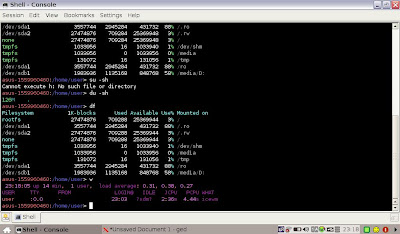
Color Wrapper(CW) will help us.
1. Install Color Wrapper
Download cw from http://sourceforge.net/projects/cwrapper/
2. Unzip and install it
tar -jxvf cw-1.0.15.tar.bz2
cd cw-1.0.15
./configure
make install
3. Set environment
* For bash: place 'export PATH="/usr/local/lib/cw:$PATH"' at the end of ~/.bash_profile(or /etc/profile globally)
* For tcsh: place 'setenv PATH "/usr/local/lib/cw:$PATH"' at the end of ~/.login(or /etc/csh.login globally)
4. Done
try df and w

2008年9月14日 星期日
SOP for Re-creating Debian binary packages with dpkg-repack
# SOP for Re-creating Debian binary packages with dpkg-repack
#
# Description:
# If you've installed a Debian package upon a machine, but lost the binary archive,
# then it is difficult to copy that package to another machine.
# Thankfully is a simple solution for recreating a Debian package from an installed system.
# dpkg-repack allows you to turn a package which you've installed back into a binary .deb file.
#
# Reference: http://www.debian-administration.org/articles/499
# Date: 2008/09/04
# Author: Payton Chou
# step 1: Download
Download dpkg-repack from here
http://packages.debian.org/etch/all/dpkg-repack/download
# step 2: Install dpkg-repack
> dpkg -i dpkg-repack_1.25_all.deb
# step 3: Search which packages need to make binary debian packages, ex. ncs
> dpkg -l | grep ncs
601:ii libvncserver0 0.9.3.dfsg.1-2asus2 API to write one's own vnc server
619:ii libxandrosncs1 0.209-2 Xandros Network Connection System library
927:ii xandros-libxandrosncsui 4.0.511-2 Xandros Network Connection System UI Library
955:ii xandros-xncsapplet 4.0.511-2 Xandros Network Connection System Applet
956:ii xandros-xncsconfig 4.0.511-2 Xandros Network Configuration Panel
957:ii xandros-xncswizard 4.0.511-2 Xandros Internet Connection Wizard
959:ii xandrosncstools 0.51-11 Xandros Network Connection System - Command
# step 4: Make binary Debian packages
> dpkg-repack xandros-libxandrosncsui
dpkg-deb: building package `xandros-libxandrosncsui' in `./xandros-libxandrosncsui_4.0.511-2_i386.deb'.
> dpkg-repack xandros-xncsapplet
dpkg-deb: building package `xandros-xncsapplet' in `./xandros-xncsapplet_4.0.511-2_i386.deb'.
> dpkg-repack xandros-xncsconfig
dpkg-deb: building package `xandros-xncsconfig' in `./xandros-xncsconfig_4.0.511-2_i386.deb'.
> dpkg-repack xandros-xncswizard
dpkg-deb: building package `xandros-xncswizard' in `./xandros-xncswizard_4.0.511-2_i386.deb'.
> ls -alh xandros*
-rw-r--r-- 1 root root 264K 2008-09-04 17:29 xandros-libxandrosncsui_4.0.511-2_i386.deb
-rw-r--r-- 1 root root 430K 2008-09-04 17:30 xandros-xncsapplet_4.0.511-2_i386.deb
-rw-r--r-- 1 root root 207K 2008-09-04 17:31 xandros-xncsconfig_4.0.511-2_i386.deb
-rw-r--r-- 1 root root 497K 2008-09-04 17:31 xandros-xncswizard_4.0.511-2_i386.deb
# step 5: Copy your debian packages to another EPC
skip
# Final step: In another EPC, and your binary Debian packages are located in /mnt/ncs
> dpkg -Ri /mnt/ncs
Reference: http://down.gogobox.com.tw/payton345/fdhy2
#
# Description:
# If you've installed a Debian package upon a machine, but lost the binary archive,
# then it is difficult to copy that package to another machine.
# Thankfully is a simple solution for recreating a Debian package from an installed system.
# dpkg-repack allows you to turn a package which you've installed back into a binary .deb file.
#
# Reference: http://www.debian-administration.org/articles/499
# Date: 2008/09/04
# Author: Payton Chou
# step 1: Download
Download dpkg-repack from here
http://packages.debian.org/etch/all/dpkg-repack/download
# step 2: Install dpkg-repack
> dpkg -i dpkg-repack_1.25_all.deb
# step 3: Search which packages need to make binary debian packages, ex. ncs
> dpkg -l | grep ncs
601:ii libvncserver0 0.9.3.dfsg.1-2asus2 API to write one's own vnc server
619:ii libxandrosncs1 0.209-2 Xandros Network Connection System library
927:ii xandros-libxandrosncsui 4.0.511-2 Xandros Network Connection System UI Library
955:ii xandros-xncsapplet 4.0.511-2 Xandros Network Connection System Applet
956:ii xandros-xncsconfig 4.0.511-2 Xandros Network Configuration Panel
957:ii xandros-xncswizard 4.0.511-2 Xandros Internet Connection Wizard
959:ii xandrosncstools 0.51-11 Xandros Network Connection System - Command
# step 4: Make binary Debian packages
> dpkg-repack xandros-libxandrosncsui
dpkg-deb: building package `xandros-libxandrosncsui' in `./xandros-libxandrosncsui_4.0.511-2_i386.deb'.
> dpkg-repack xandros-xncsapplet
dpkg-deb: building package `xandros-xncsapplet' in `./xandros-xncsapplet_4.0.511-2_i386.deb'.
> dpkg-repack xandros-xncsconfig
dpkg-deb: building package `xandros-xncsconfig' in `./xandros-xncsconfig_4.0.511-2_i386.deb'.
> dpkg-repack xandros-xncswizard
dpkg-deb: building package `xandros-xncswizard' in `./xandros-xncswizard_4.0.511-2_i386.deb'.
> ls -alh xandros*
-rw-r--r-- 1 root root 264K 2008-09-04 17:29 xandros-libxandrosncsui_4.0.511-2_i386.deb
-rw-r--r-- 1 root root 430K 2008-09-04 17:30 xandros-xncsapplet_4.0.511-2_i386.deb
-rw-r--r-- 1 root root 207K 2008-09-04 17:31 xandros-xncsconfig_4.0.511-2_i386.deb
-rw-r--r-- 1 root root 497K 2008-09-04 17:31 xandros-xncswizard_4.0.511-2_i386.deb
# step 5: Copy your debian packages to another EPC
skip
# Final step: In another EPC, and your binary Debian packages are located in /mnt/ncs
> dpkg -Ri /mnt/ncs
Reference: http://down.gogobox.com.tw/payton345/fdhy2
訂閱:
文章 (Atom)

 發表文章
發表文章

